Custom orders
Fixed source defines Custom orders as a Pro Settings surface backed by the custom_order plugin. It is separate from the operational Orders → Create custom order flow.
Availability and access
The source adds the Custom Orders category only after an authenticated plugin-key read reports installation; otherwise the component emits navigation to the plugin listing.
The component requests its schema through the plugin root returned for a project. Therefore, names, descriptions, initial values, and numeric types are external returned data rather than fixed Dashboard definitions.
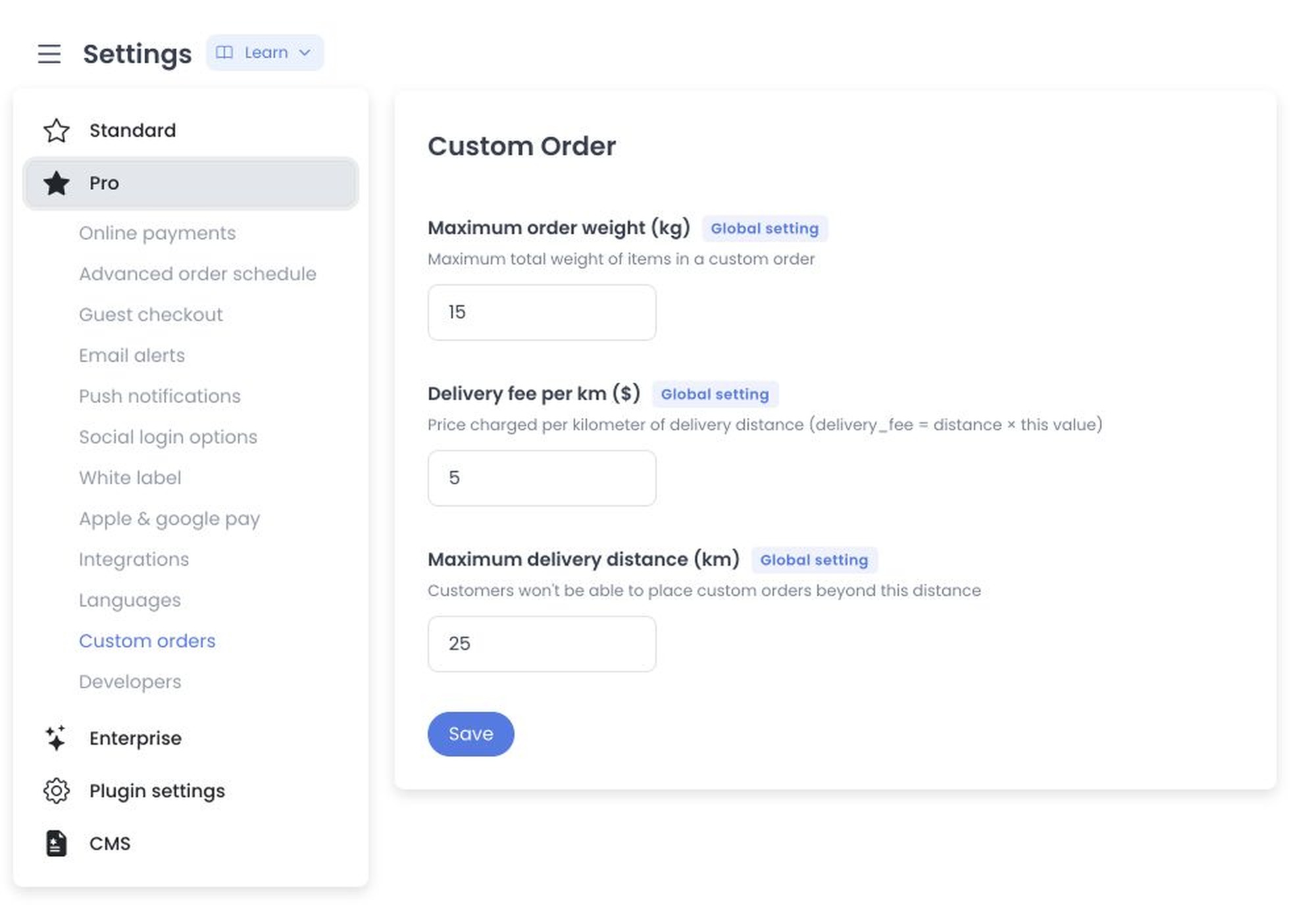
Returned schema and input mechanics
Each delivered setting is displayed as a numeric input with a minimum of 0:
- Whole-number settings use a step of
1. - Settings declared as decimal values use a step of
0.01. - The input placeholder shows the value returned by the plugin when no edited value is present.
The fixed component treats max_weight, delivery_fee_multiplier, and max_distance as administrator-only global keys. The following labels and meanings are historical returned-schema evidence, not static UI definitions:
- Maximum order weight (kg) — the weight limit used for an order.
- Delivery fee per km ($) — the delivery fee is calculated from distance multiplied by this value.
- Maximum delivery distance (km) — the maximum distance for delivery eligibility.
Returned names, descriptions, types, values, validation, units, and currency can differ. Source inspection does not establish that any of these records exists in a current project.
External read and combined-write boundary
On mount, the source first requests the installed plugin by key. If absent, it emits navigation to the plugin listing. If present, it uses the returned plugin root and project code to request the plugin’s settings schema. The root is therefore an external/provider trust boundary, not a portable documentation URL.
Save converts every displayed local value with parseFloat(value) || 0 and sends one combined POST to the plugin settings URL. The loading state disables the form while that request is pending. A toast or returned error is local response handling, not persistence or operational-effect evidence. No plugin lookup, external read, navigation, or write ran.
The numeric input advertises a minimum of 0 and step 1 or 0.01, but the handler’s blank/non-numeric conversion to 0 and plugin-side validation remain separate. No meaning such as “unlimited” is source-established.
Separation from order creation
This settings component does not mount the operational Orders → Create custom order form and does not itself submit an order.
Historical order-flow fields and claims about customer, address, location, store, products, totals, cash, eligibility, fees, notification, or reporting require separate current-source and synthetic-runtime evidence. They are not authority for this settings page and remain excluded.
No order, customer, address, map location, product, total, payment, plugin value, PII, or operational write was read or exercised.
Source-only boundaries
- The literal route is
/all-settings?category=custom_order; the Pro menu adds it only after an authenticated plugin-key lookup reports installation. /all-settingsis level-0 routed; global keys are additionally hidden when the component’s user is not level 0.- Fixed API source declares the plugin-by-key route; the returned plugin root owns the separate schema/read/write contract and has no deployment receipt here.
- Re-entry requires immutable Dashboard/API and plugin serving receipts plus a synthetic project with plugin lookup, external schema read, navigation, combined write, order data, and provider egress intercepted.
Related guides: Create custom order