Available order types
Use Order types to choose which fulfillment options the project offers and which one customers start with.
Open Available order types
Sign in as an administrator and open Settings → Orders & checkout → Order types.
Related procedures
See Troubleshoot stores not showing and Checkout by order type.
Benefits
Offer the types your operation can fulfill. Customers see the options their ordering channel and store can support.
Delivery options
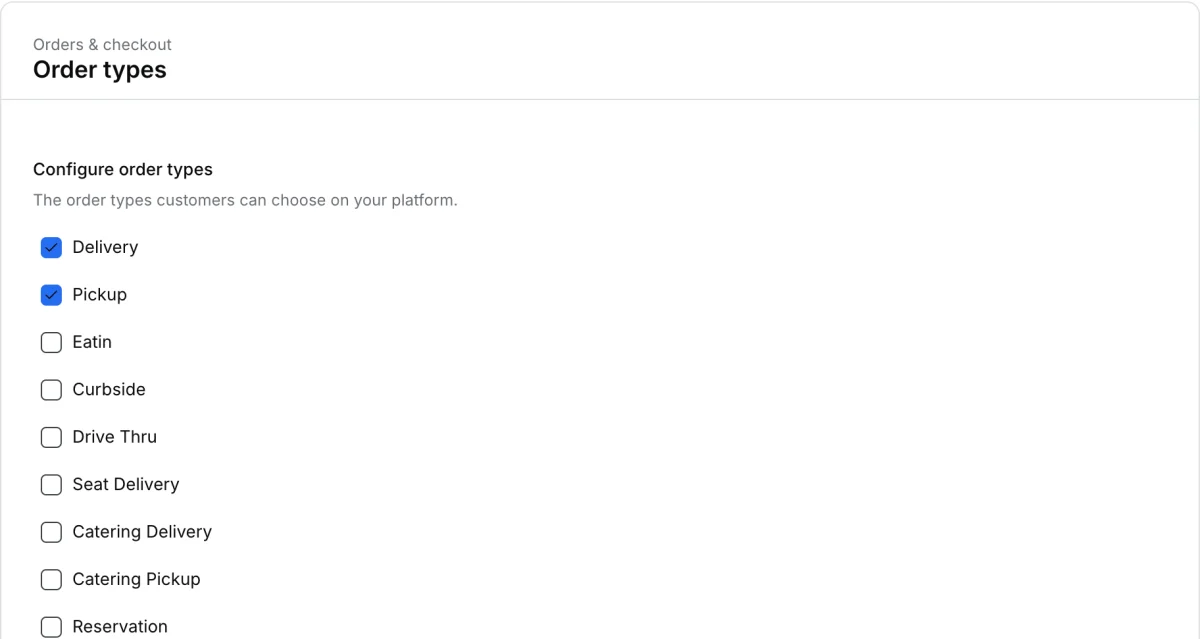
Depending on the catalog, the project can configure Delivery, Pickup, Eat in, Curbside, Drive thru, Seat delivery, Catering delivery or pickup, and Reservation. Settings does not hide the advanced types behind a Pro or Enterprise menu.
How it works
The project controls which types can be offered. The store, menu, schedule, location, and ordering channel determine whether a specific type is available to a shopper.
Default Order Type
Choose Default order type from the types you offer. Verify the initial selection in a fresh customer session on each relevant channel.
Configure order types
In the allowed types control, select the types you need and choose Save changes. Check a store that should offer each type and one that should not.
Maximum Pickup Distance
Use Maximum pickup distance to limit pickup eligibility by distance where the channel supports the rule. Check the distance unit and test locations on both sides of the limit.
Set Tips for Pickup Orders
Use Set tips for pickup orders to allow tipping on eligible pickup orders. Check checkout on the supported channel.
Address Adjustment Limit
Address adjustment limit controls the allowed location adjustment where the channel supports it. Check the unit shown and validate with a test address.
Set No-Address Order Types
Use Set no-address order types to choose which enabled types can start without an address where supported. A delivery flow can still need an address later.
Practical configurations
For example, a pickup-only project can offer Pickup and set it as the default. Open the website in a fresh session and confirm that an eligible store appears and its pickup menu is available.
Conclusion
After saving, verify both the available type selector and the actual store or checkout result.