Cancel an order
The current Dashboard source presents Rejected by admin in the selector's Cancelled group. Selecting it requests status code 2 through the order update endpoint; the inspected selector does not add a separate confirmation dialog.
The source disables the selector for view-only use. The API independently validates the caller, order scope, temporary order lock, status value, and applicable transition rules.
Before you start
- Open the intended order and confirm its order number, customer, and current status.
- Check whether the order is still operationally eligible for a status change.
- Do not learn this workflow on a live order. Selecting the status submits an operational write from the inspected Dashboard source.
Mark an order as cancelled
- In the Dashboard sidebar, select Orders, then Orders list.
- Select the order to open its detail panel.
- Under Order status, open the current-status selector.
- In the Cancelled section, select Rejected by admin.
- Review the result shown by the Dashboard. Treat the request as unaccepted if the selector resets or an error appears.
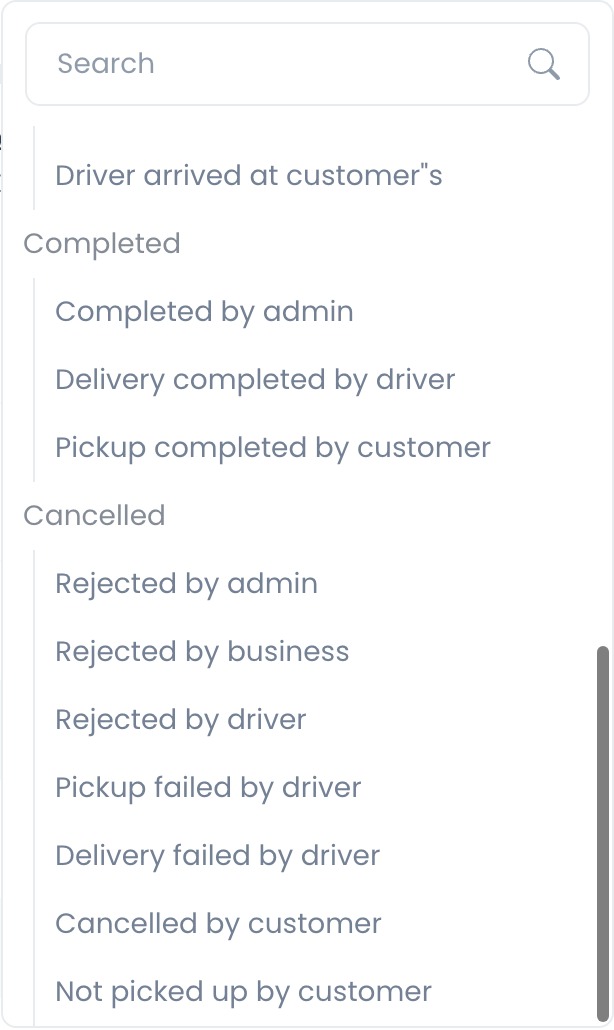
The inspected selector does not ask for a second confirmation before submitting status 2. Do not use this action merely to test the selector on a live order.
What happens after the update
The client categorizes Rejected by admin under Cancelled. API source contains status hooks, order-change history, logistics cleanup, jobs, and notification paths around accepted updates. Their deployed execution and project-specific enablement are not established by this source-only review.
Rejected by admin is only one status in the Cancelled group. Other outcomes, such as rejection by a business or driver, customer cancellation, and delivery failure, can be set by their respective operational workflows.
Refunds are separate
The inspected status-update request submits only the new status (and an optional regression reason). It does not call the separate refund request found elsewhere in the order detail source.
Refund controls and provider behavior are outside this article's verified scope. Do not infer or promise a refund from a cancellation-status request.
Verification checklist
- The detail panel shows the intended order number and customer before the update.
- Rejected by admin is shown as the current Order status only after an accepted response.
- The selector did not reset to the prior status and no returned error remains.
- No refund or other payment outcome has been inferred from the status request.
Troubleshooting
Why is the Order status selector disabled?
Your account may be read-only, or you may not have permission to change this order. Ask a permitted administrator or operational manager to review it.
Why did the status return to its previous value?
The inspected client resets the selector when its request returns an error. API source includes temporary-lock, role, order-scope, regression, and operational validations. Review the returned message before deciding whether another attempt is appropriate.
Why do I not see a cancellation confirmation?
The current source submits the status when you select Rejected by admin and contains no second confirmation step in this control. Review the order before opening the selector.
Was the payment refunded when I cancelled the order?
No refund is established by this workflow. The inspected cancellation request and refund request are separate in source, and no provider or deployed refund behavior was tested.
Related guides: Update an order status · View and manage an order · Order status reference