Import a menu and resolve errors
The current source defines a menu-import surface for a selected business. It sends authenticated business and source information to a separately configured menu-import service. This guide documents that fixed-source contract; it is not evidence that the service is deployed, available, or safe to exercise in a live project.
Do not use a live business, menu, provider account, URL, credential, token, or import record to validate this page. Import, synchronization, log download, log deletion, retry, and provider calls are effectful or sensitive operations and remain outside this documentation review.
Availability and navigation
The route is /connect/importers. Current routing restricts it to level-0 administrators and redirects to Dashboard home when its import capability is unavailable. The sidebar applies additional gates:
- the Connect parent must be available for an Enterprise project with the Dashboard Connect flag, or for an eligible Pro project in Connect Pro mode;
- the user must not be a read-only administrator, read-only delivery manager, read-only/view-only business owner, or a level excluded by the Connect parent;
- the Importers item requires the Importers flag, the POS & Menu Sync flag, or eligible Connect Pro mode.
Route eligibility and sidebar visibility are separate checks. A visible or present route does not prove that the configured import service is available.
Select a business and source
The fixed source loads an authenticated, paginated business list. Its query state can include page, page size, active state, and a selected business ID; search is configured for business name, email, and phone. Those fields are authenticated business data and must not be copied into public evidence.
After a business is selected, the source presents these import cards:
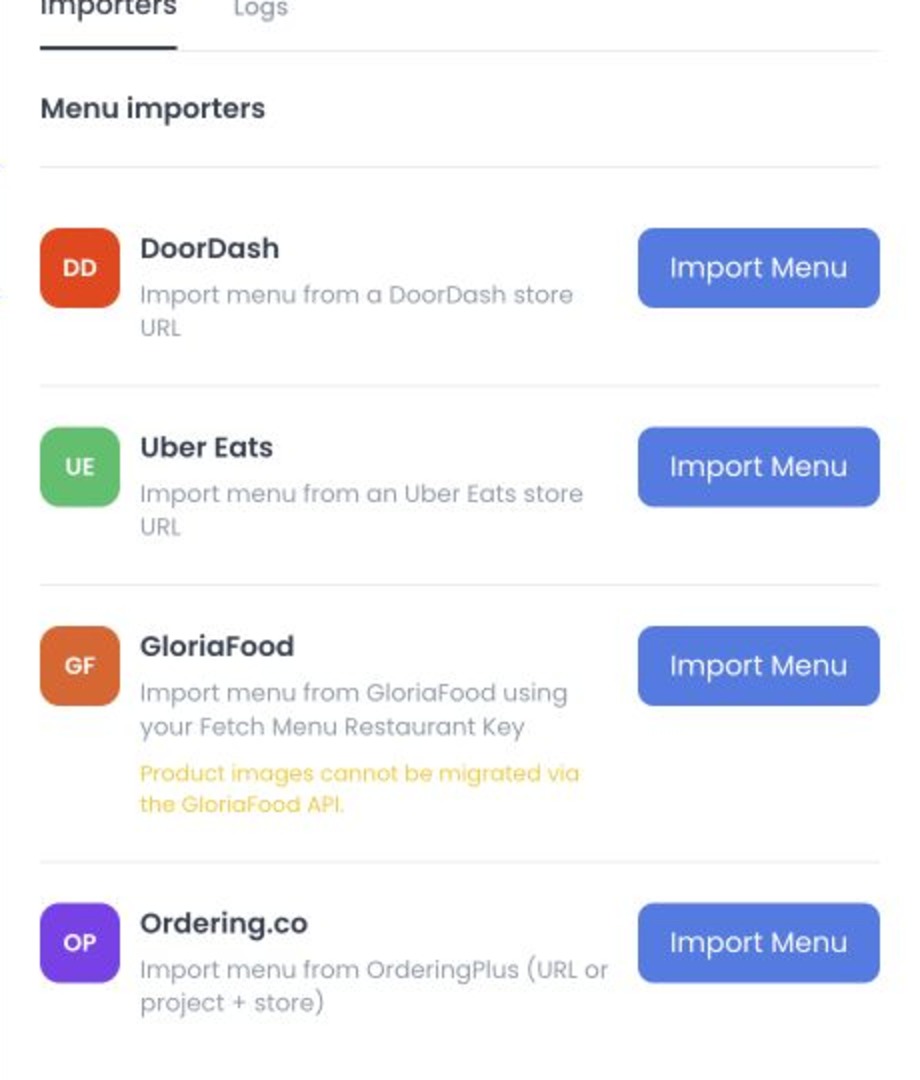
| Source card | Source-defined input boundary |
|---|---|
| DoorDash | A source URL matching the expected provider domain; the form also exposes an include-variants choice. |
| Uber Eats | A source URL matching the expected provider domain; the form also exposes an include-variants choice. |
| GloriaFood | Restaurant Key plus Master Key fields and an option related to provider choice limits. Both key fields gate submission in the reviewed form. |
| OrderingPlus | Either a compatible business URL or a complete project-and-business pair. |
These are input-shape observations, not authorization to collect, display, or submit provider information.
Both GloriaFood keys gate the client action. Current source removes the Master Key from the configured import-service request body, but the subsequent optional logging path can submit both Restaurant Key and Master Key for later prefill; logging failure does not change the import success UI.
Request and result boundaries
The current Dashboard source builds a request to the separately configured menu-import service for the selected source. It includes authenticated project context, the selected business, the Ordering API base context, and the source-specific form values. The form is disabled while that request is pending.
The UI distinguishes these states:
- missing service configuration blocks submission locally;
- local validation can reject missing or structurally invalid source input;
- an unsuccessful service response is mapped to a general or source-specific error;
- a response interpreted by the client as successful changes the modal to its success view and offers navigation to the selected business's Products page.
The success view proves only which client branch the reviewed source would render after the response. It does not prove that a deployed service imported a menu, that a provider completed work, that records reconciled, or that a retry is safe.
Error classification
| Source-defined condition | Documentation boundary |
|---|---|
| Required input is missing or malformed | Describe the form gate only; do not reproduce a real URL, key, project, or business identifier. |
| Menu-import service configuration is absent | Treat the flow as unavailable; route visibility is not service authority. |
| GloriaFood reports access, timeout, or empty-menu classes | Record only the error class. Do not infer provider state or recommend an immediate retry. |
| A general service error is returned | The source does not establish idempotency, rollback, backoff, or duplicate protection. |
| A request times out or its outcome is unclear | The source cannot prove whether a downstream effect occurred. Keep retry and completion claims blocked. |
Saved source and log boundaries
When the optional import-log service is configured, the source can request prior import metadata for a business and use saved source values to prefill a modal. It also contains raw-log download and deletion request paths. Those paths may involve credentials, provider responses, business identifiers, files, and destructive effects.
This guide does not expose saved values or authorize log reads, downloads, deletions, or retention claims. The generic CSV/import-job framework in the core API is a different surface and is not evidence for this menu-import service.
What remains unverified
Without immutable Dashboard and service-serving receipts plus an approved synthetic fixture, this page does not claim:
- provider authentication, availability, completion, or response meaning;
- deployed request schemas, callbacks, jobs, retries, rollback, or duplicate protection;
- successful menu creation, update, variant mapping, or reconciliation;
- safety of any read, write, download, deletion, external link, or retry.
Related guides: Importers · POS & Menu Sync overview · Products overview