Understand fulfillment and delivery-option states
Ordering.co Customer App uses two different choice families:
- An order type sets the shared fulfillment context used while customers discover businesses and prepare carts.
- A delivery option is a cart-specific instruction shown in Checkout when the current delivery flow supports it.
They are not interchangeable. A highlighted card, closed sheet, changed label, or return to Checkout does not prove that the order type, address, cart, delivery instruction, fee, total, or payment readiness has finished updating.
Delivery instructions are project-defined. They can be absent for a cart, fulfillment type, business, customer context, or current configuration. Use only the choices currently shown in Checkout.
Distinguish the two choices
| Surface | Scope | What it means |
|---|---|---|
| Order type picker | Shared ordering context | It can affect business availability, address requirements, carts, and Checkout. |
| Checkout delivery options | One current cart | It captures an instruction for the delivery flow shown by that cart. |
| Multi-business Checkout | A group and its member carts | A shared change can still need a current result for each member cart. |
Do not tell a customer to look for a global order type picker inside every single-cart Checkout. Its absence can be expected. Likewise, choosing a delivery instruction does not change the global order type.
Choose a delivery instruction in Checkout
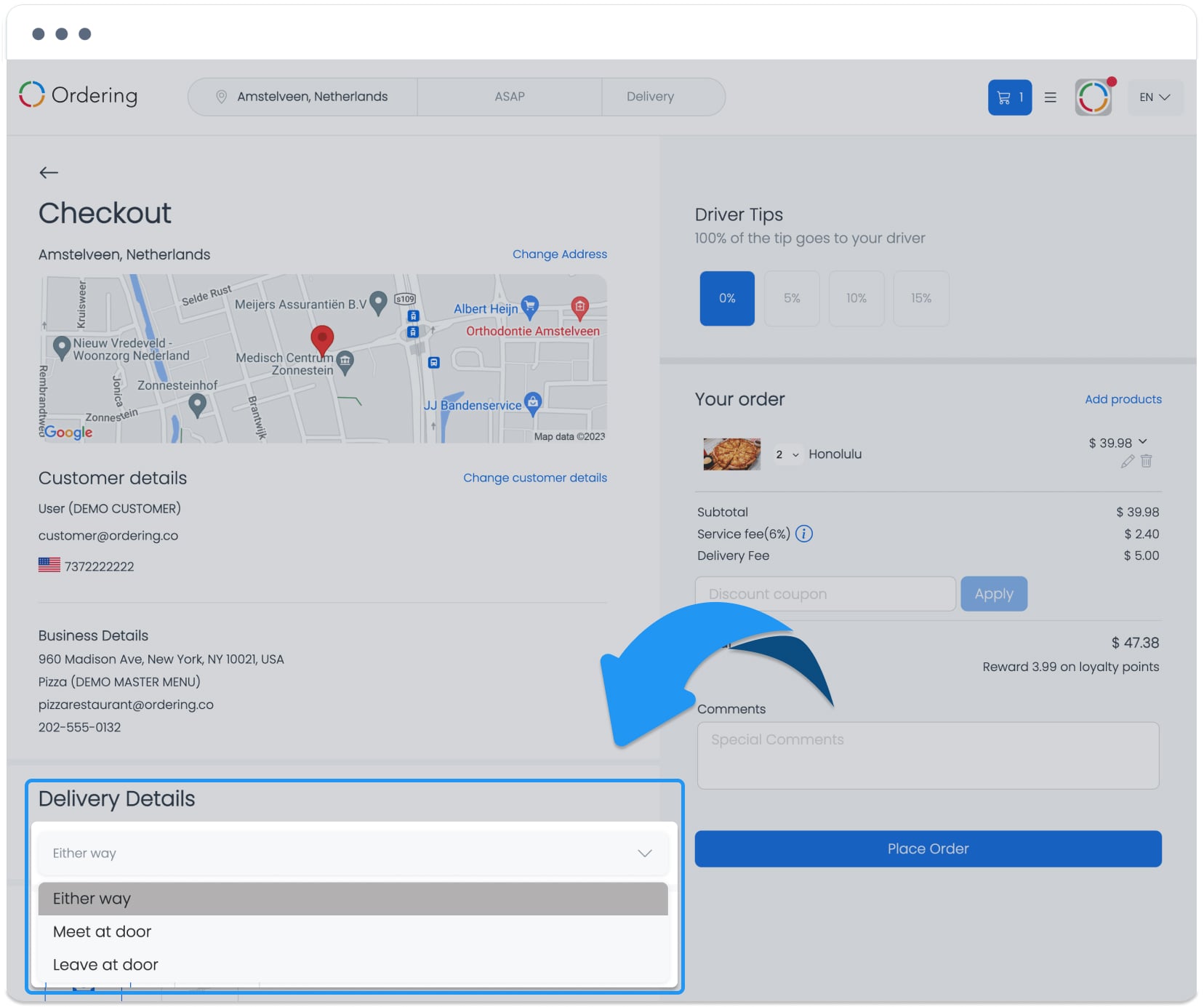
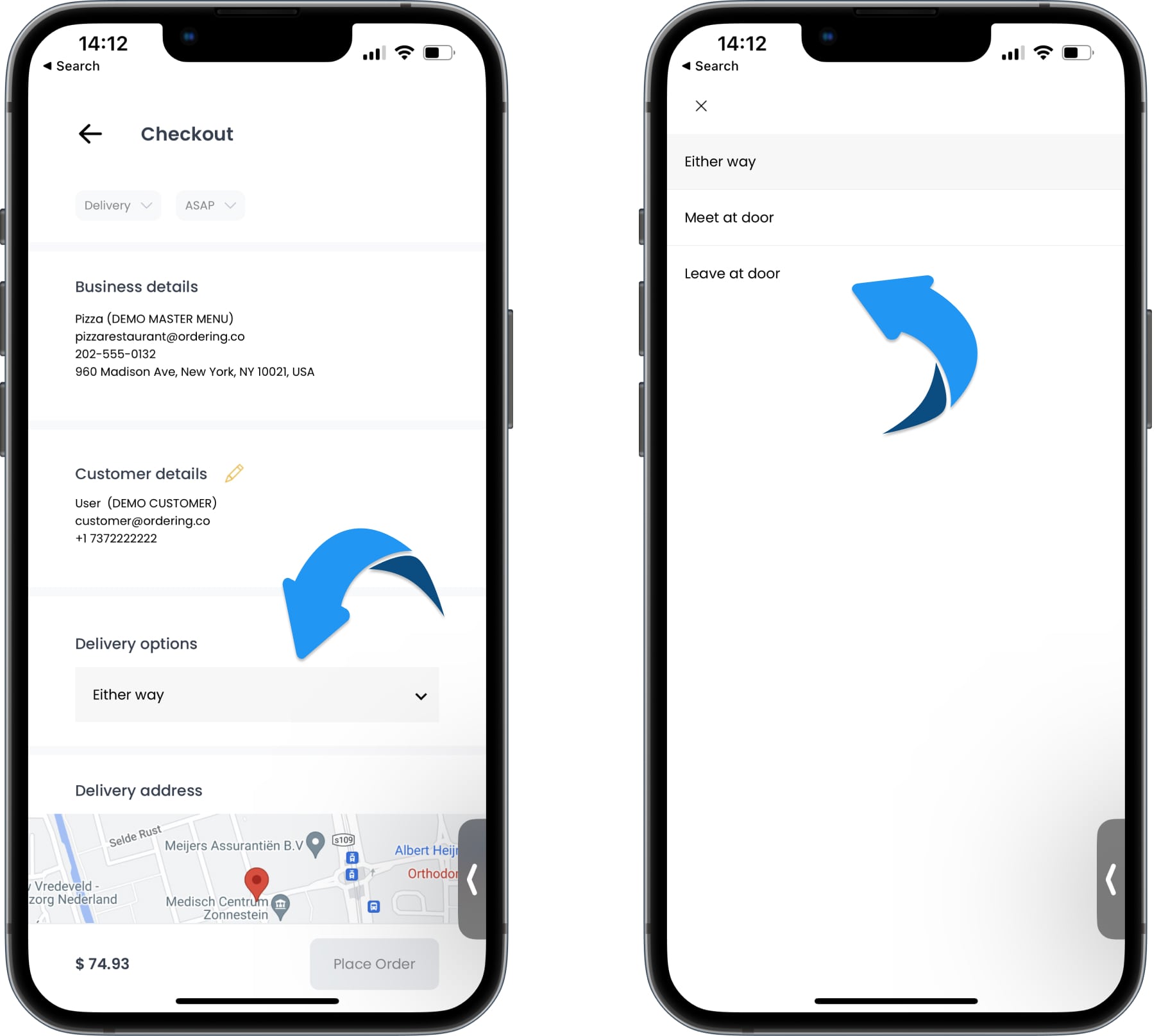
When the current cart uses Delivery, Checkout can show a delivery-details or delivery-options control after the delivery method. Select the instruction that matches the customer's handoff preference, then review the current Checkout before placing the order.

The exact labels depend on configuration. Examples include:
- In-person delivery or Meet at door;
- Meet the driver outside; and
- No contact / Leave order at my door or Leave at door.
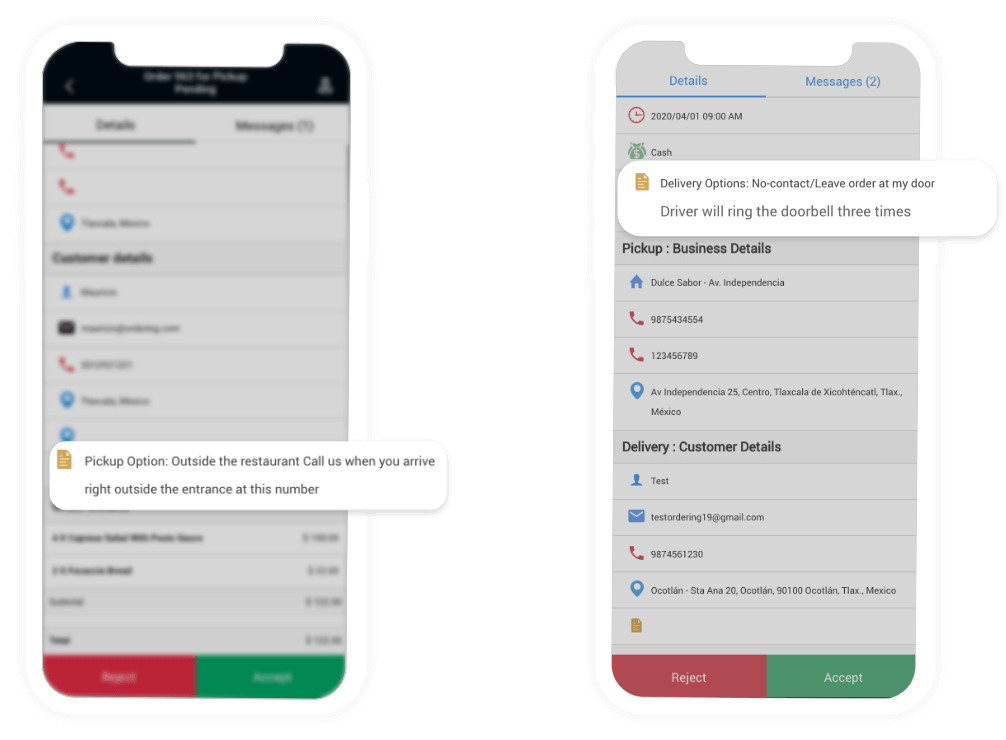
A no-contact option can include a specific handoff instruction, such as ringing the doorbell or knocking three times, when that instruction is enabled. Do not assume it applies when the current option does not display it.
The selected instruction can be shown to the business and driver in the operational flows that the current project supports. Confirm that handoff in the current Business App or Driver App before relying on it operationally.
Configure and verify availability
The current project defines the delivery options that can be offered, including their enabled state and an optional delivery-type association. An operator should confirm:
- the intended order type is enabled for the project;
- the delivery option is enabled and correctly associated with the applicable delivery type when an association is used;
- the business and cart can use the chosen fulfillment type; and
- the customer sees the intended instruction in the current Checkout.
The global order type, shared order context, profile-completion logic, Checkout, theme, and API can recognize different type sets or numeric and string representations. A type visible in one surface is not proof that every other surface accepts it. Unknown, missing, duplicated, malformed, disabled, or differently mapped values must not replace a valid current context.
Know what changes after a selection
A global order-type change can proceed through several stages:
- A type card changes local selected state.
- Continue begins the shared order-type change.
- The local ordering context and stored options can update.
- Authenticated order options can update.
- Address or city requirements, carts, business availability, schedule, fields, fees, totals, payment readiness, plugins, sockets, and related state can recalculate.
The screen can return before every stage settles. A delivery-option selection also has separate presentation, cart persistence, and financial recalculation stages. A closed popup is a presentation change, not a cart-write receipt.
Changing a fulfillment type can also affect whether an address or city is required. A saved address, default address, active order address, cart address, city filter, and business serviceability are separate records. Clearing, showing, or requesting one of them does not prove that every related record has updated.
Treat hidden and multi-cart states separately
Checkout can load delivery-instruction data even while it hides the visible control for the current type, gift, school, or other condition. Hidden UI does not prove that no related read or cart work occurred.
In multi-business Checkout, a customer can return from the global order-type picker while the group and member carts are still recalculating. One cart can accept, reject, or lag behind the change independently. Do not continue to place or pay until the current group and every member cart show a reconciled result.
| What you see | Safe interpretation |
|---|---|
| Order-type cards loading or disabled | Shared order state is still resolving. |
| A type or delivery option looks selected | The local control changed or matches returned state; persistence and recalculation are separate. |
| No type cards or no delivery section | The current configuration or cart does not display a choice; it does not prove universal unavailability. |
| The delivery popup closes | The local presentation changed; confirm the current cart state instead of inferring a saved choice. |
| A label reverts, fees or totals do not update | The local choice and cart state can disagree, or recalculation can be stale or incomplete. |
| Member carts show different types or options | Preserve each cart's result; do not infer group completion. |
| A response is lost or account or project changes | Treat the prior result as unknown and do not apply it to the current context. |
Troubleshoot without creating a second change
- Identify whether the control changes the global order type or a single cart's delivery instruction.
- Treat Back, a sheet close, and return to Checkout as navigation rather than a completed update.
- Do not switch types or instructions repeatedly to test business availability, schedules, addresses, fees, totals, payment readiness, or provider behavior.
- Do not copy an address or city into a stale context to repair it.
- If member carts disagree, preserve their individual states and do not continue to the final order action.
- Use a value-free description such as “delivery instruction and cart do not match” when reporting a problem.
Accessibility and privacy
Order-type cards, selected, disabled, loading, error, and unknown states, Continue, the delivery-options sheet, option rows, Back, address requirements, and multi-cart outcomes need clear text, semantic roles, values, and announcements. Do not rely on color, icon, sheet closure, row order, or header text alone.
Do not expose an address, city, cart or group identifier, business details, delivery-option configuration, provider data, or raw error in labels, screenshots, logs, or support notes. Large text, keyboard and screen-reader support, safe areas, reduced motion, and iOS or Android Back behavior must not hide the choice scope or repeat a change.
Related guides: Choose order type and time · Schedule and preorder · Review customer and delivery details · Review your cart before checkout · Understand multi-business checkout · Understand checkout recovery states