How an order moves
Every order passes through the same steps between customer, merchant, and driver. Knowing them lets you spot a stuck order in seconds and explain any delay to a customer.
Where: Orders › Orders list
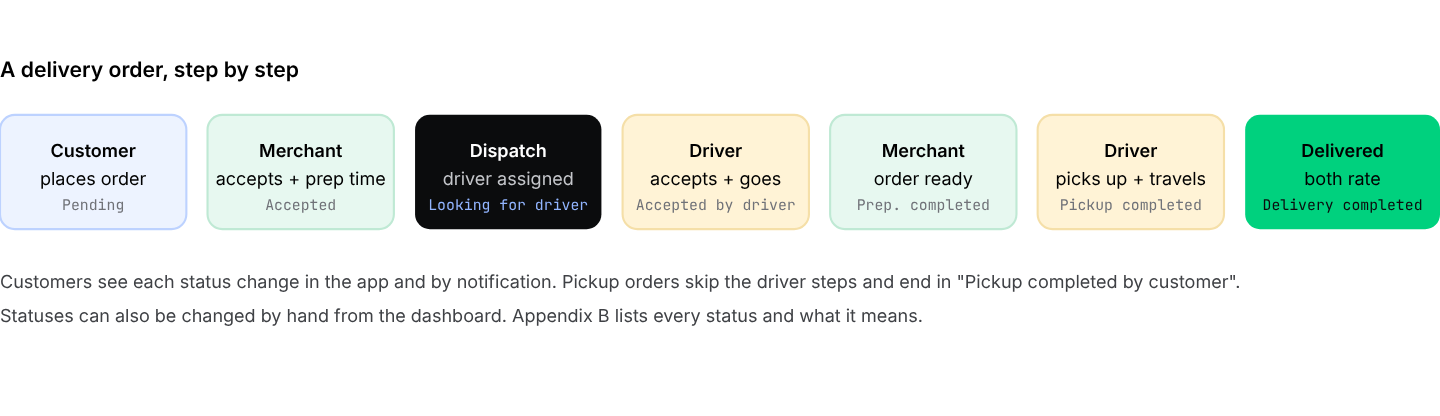
The order journey. The order in which "driver accepts" and "order ready" happen depends on your dispatch rules.
Watch orders from the dashboard
The orders list groups orders into Pending, In progress, Completed, and Cancelled. Open any order to see what was ordered, the customer, the store, the driver, a timeline of every status change, and the messages between everyone involved. You can change the status, assign or change the driver, and create a manual order for phone customers.
An order that stays in Pending means the merchant has not accepted it. Most problems start here: a muted tablet, a closed app, or a busy counter. Call the merchant after a few minutes; do not wait for the customer to complain.
Live tracking and messages
Once a driver accepts, the customer and you can follow the driver on the map in real time. The driver's phone needs location turned on and an internet connection. Inside each order there is a chat: the customer, merchant, driver, and you can exchange messages and photos, and the driver can capture the customer's signature at delivery. Everything stays in the order's history.
Complaints, cancellations, and refunds
- Cancel an order by changing its status, for example to rejected by admin. Add a note first so the reason stays in the order history.
- Complaint after delivery: the chat closes when the order ends, but you can still record what happened in the order history and update the status.
- Refund to wallet: once refunds are enabled in your settings, an order can be refunded to the customer's wallet with one button.
- Card refunds are processed in your payment gateway's own dashboard.
Decide in advance who pays for a missing item, a late order, or a damaged delivery: the merchant, the driver, or you. Publish a short version on your Help page and share the full version with merchants.