Commissions and split payments
How you earn from each order, and how merchants get their share. There are two models: collect and pay out, or split each payment automatically.
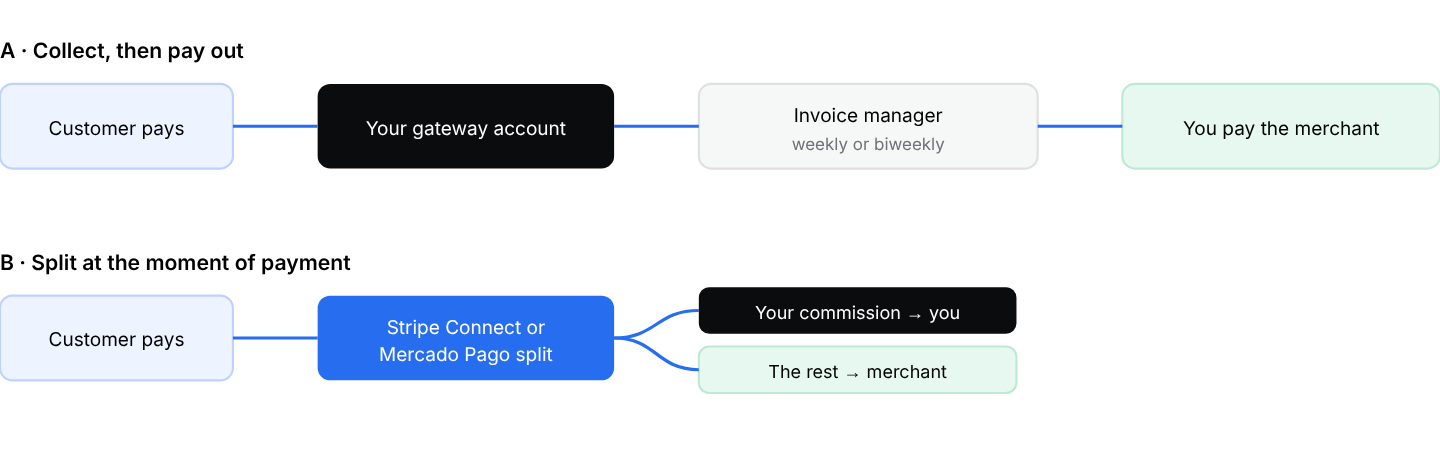
Two ways to get paid. Model B saves you from paying merchants by hand, but each merchant needs its own gateway account.
Model A · Collect, then pay out
All card payments land in your gateway account. On a fixed schedule you create an invoice per merchant with the invoice manager (Chapter 25), deduct your commission, and transfer the rest. It is simple to start and works with any gateway, but it means manual transfers.
Model B · Split payments with Stripe Connect
- Set up Stripe Connect once. Follow the Stripe Connect platform setup article in the knowledge base: it gives the exact Stripe settings for your project. Copy your live and test Client IDs into the Stripe Connect add-on settings in your dashboard.
- Connect each store. In the store's Payment methods, choose Stripe Connect and click Connect with Stripe. The merchant logs in to, or creates, their own Stripe account. Review the fields that come back, then save.
- Set your commission on the store: a fixed fee or a percentage per order.
Your percentage is calculated on the product subtotal. Taxes, the delivery fee, and the driver tip are not part of the commission base. Check the knowledge base article for your gateway for the exact rules.
Model B · Split payments with Mercado Pago
- Install the Mercado Pago plugin (Settings › Pro › Developers › Plugins) and enter your marketplace account credentials in its plugin settings. That is where your commission arrives.
- In each store's payment methods, set your commission percentage and connect the merchant's own Mercado Pago business account, with the connect option or by entering the merchant's credentials, depending on your setup.
- Test in sandbox first, keeping the sandbox setting the same at plugin and store level.
Cash and card-on-delivery payments do not pass through the gateway, so they are not split. Settle them with each merchant and driver through invoices at the end of each period.