Request your apps: assets and timeline
Once your developer accounts are open and shared, send the app request form. The Ordering.co team builds your branded apps, sends you test versions, and guides them through Apple and Google review.
Your time: 1 hour · Do this: by day 7
Send the app request form
Open the form here: share.hsforms.com/1Z45SRiL6Qe-bA8ZVwl1bFwrr9sb. It asks for your project name, the apps you need, their names, and your brand files. Fill it in once, completely. A form with missing pieces waits in the queue until everything arrives.
What to prepare
| Item | Details |
|---|---|
| App names | The name under the icon and in the store listing. Google allows up to 30 characters. Treat it as final: changing a name after submission restarts reviews. Example: Northside Eats: Food & Grocery. |
| App icon and logo | Your logo as a high-resolution PNG with a transparent background. Square artwork works best for icons. |
| Brand colors | Your primary color and background color as hex codes, such as #1F5FD1. |
| Short and full descriptions | What the app does in plain words: who it is for, what customers can order, and where you deliver. |
| Privacy policy URL | Required by both stores. Create it as a page in your website's CMS (Chapter 11) and paste its link. |
| Account deletion URL | Google asks for a page where users can request account deletion. A CMS page explaining how works. |
| Support contact | An email and URL where customers can get help. |
| Test logins | Store reviewers need a working business owner login and driver login to review the Business App and Driver App. |
| One real store | At least one complete, real store with a real menu. Apple and Google reject apps that only show demo content. |
The app icon, splash screen, and tutorial images are compiled into the app. Changing them later means a new build and a new store review. Get them right before you submit. Menus, stores, and prices are different: those update instantly from the dashboard.
What happens after you send it
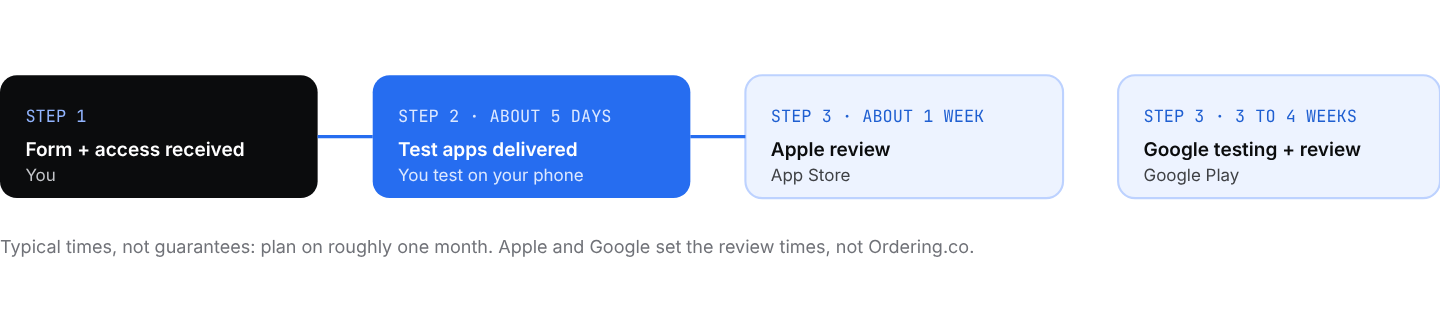
The app timeline. Apple and Google reviews run in parallel after you approve the test versions.
- Test versions arrive in about five business days. You receive links to install them on your own phones: TestFlight for iPhone, and a Google Play testing link for Android.
- Test them and reply with any changes. Place an order, check the name, icon, and colors. Small text fixes are quick; image changes need a new build.
- Apple review typically takes about a week. Rejections are usually small: a missing screenshot or a privacy detail. The team fixes and resubmits.
- Plan three to four weeks for Google. Google's review of a new developer account usually takes longer than Apple's. Personal accounts must also run a closed test with real testers before the app can go public, which is one more reason to enroll as an organization. If a test is needed, you receive a "join" link to share with your testers.
Testers must open the join link while signed in to the same Google account that is on the tester list, then accept the invitation. If a tester sees "URL not found", they are almost always signed in with a different Google account on that phone. Recruit friends, staff, and merchants as testers early.
"Can I launch before the apps are approved?"
Yes. Your website takes orders from day one. Many owners launch on the web, sign up their first customers, and announce the apps when they go live.