Your 30-day launch plan
A realistic marketplace launch takes about a month. Most of that time is the Apple and Google review, which runs in the background while you build. Here is the order that keeps you moving.
Use it as: your checklist · Adjust: to your pace
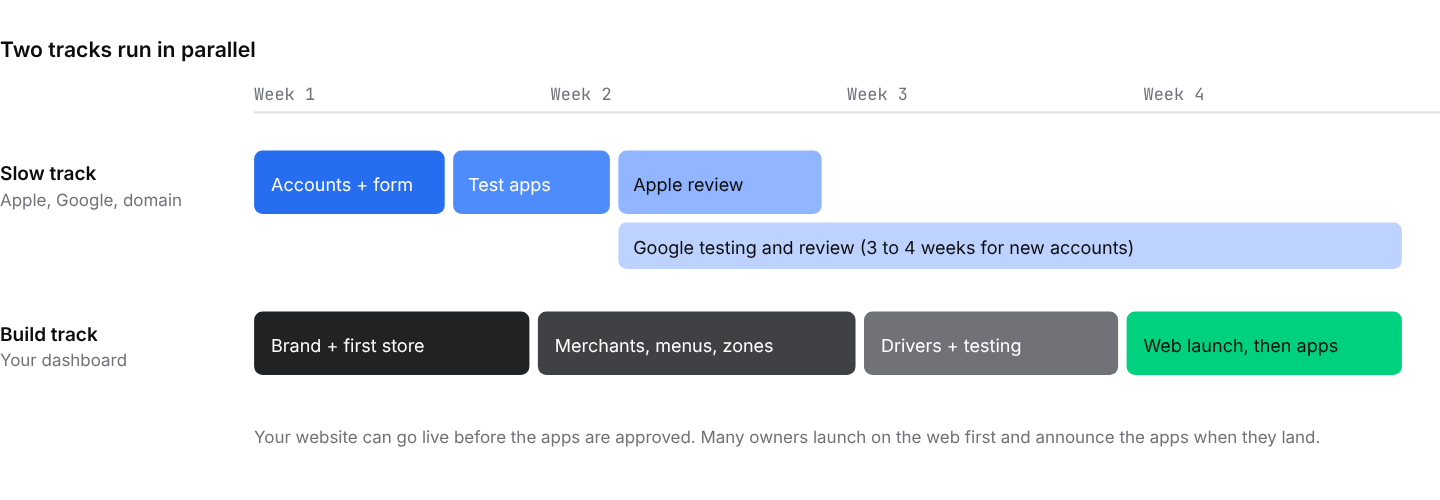
The slow track depends on Apple, Google, and your domain provider. Start it on day one.
| When | What to do |
|---|---|
| Day 1 | Sign in (Ch. 2). Open your Apple and Google developer accounts as an organization (Ch. 8). Register or choose your domain (Ch. 10). |
| Days 2–3 | Create your Google Maps API key (Ch. 10). Brand your website: logo, colors, homepage (Ch. 11). Create your business categories (Ch. 12). |
| Days 3–5 | Build your first store completely: details, menu, schedule, zones, payments (Ch. 13 to Ch. 19). Place a test order on it. |
| Days 5–7 | Grant Ordering.co access to your developer accounts and submit the app request form with one real store live (Ch. 8 and Ch. 9). Point your domain (Ch. 10). |
| Week 2 | Add your first merchants and business owners (Ch. 20 to Ch. 23). Import their menus (Ch. 15). Set commissions and payment splits (Ch. 24). Your test apps arrive for review. |
| Week 3 | Create drivers and delivery groups, turn on automatic dispatch (Ch. 26 to Ch. 28). Train merchants on the Business App. Run full test orders (Ch. 31). |
| Week 4 | Pre-launch checklist (Ch. 32). Soft launch on the web with friends and merchants' regulars. Prepare launch marketing (Ch. 33 and Ch. 34). |
| Day 30 + | Apps go live in the stores. Announce them. Review reports weekly and keep adding merchants (Ch. 37 and Ch. 38). |
Tip
Apple and Google reject apps that have no real content. Have at least one real store with a real menu live before you submit the app request form. That is why store building sits in the first week.